
AI Fashion Prompts for Midjourney: 10 Powerful Hacks for Stunning Results
If you’ve spent an evening typing outfit descriptions into Midjourney and getting back melted hands, warped fabric, or a face that looks nothing like what you pictured, you’re not doing anything wrong — you just haven’t learned the structure yet. AI fashion prompts for Midjourney work completely differently from a casual “make her look pretty in a dress” request. They’re closer to a photography brief than a wish list, and once you understand the layers that go into one, the quality jump is immediate.
I’ve spent the better part of the last year running fashion prompts through every major Midjourney version, from the early V5 days to the current V7 model, testing what actually moves the needle versus what’s just prompt-engineering folklore. This guide is the distilled version of that testing: ten hacks, in the order I’d teach them to a friend, each with a plain-English explanation and a prompt you can copy, tweak, and run today.
What makes fashion prompting its own skill, separate from general AI image prompting, is that clothing is unforgiving. A landscape can be “close enough” and still look good. A blazer with the lapel folded the wrong way, or a hemline that doesn’t match the fabric’s actual drape, reads as wrong immediately — your eye has seen thousands of real garments and it notices. That’s why the hacks below lean so heavily on precise, almost technical language rather than mood words alone. Mood gets you 60% of the way there. Precision gets you the rest. If you’re still getting comfortable with prompt basics, our post on how to write AI fashion prompts is a good primer before diving into the hacks below.
Hack 1: Master the Core Prompt Formula
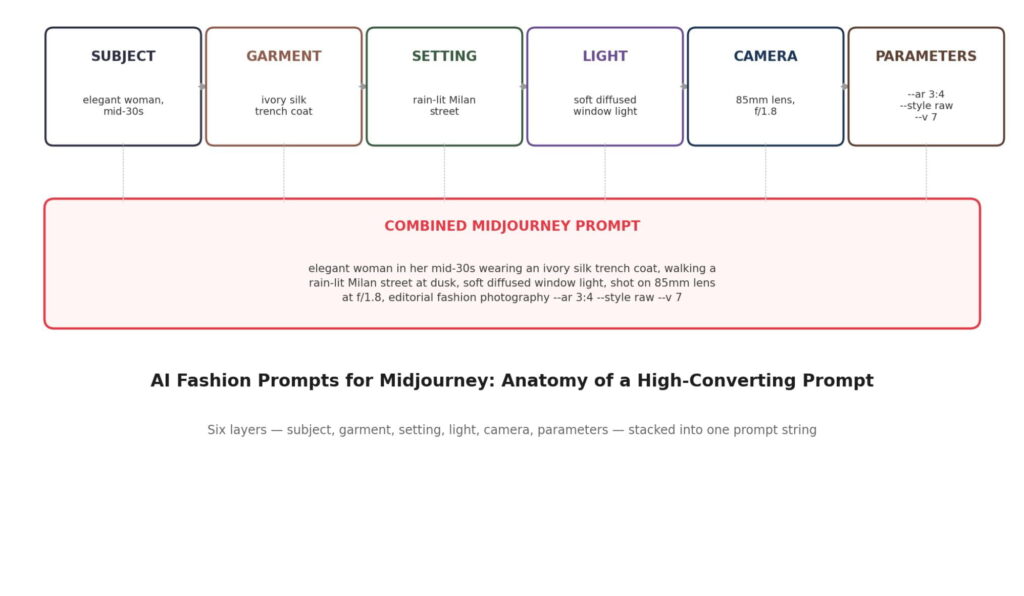
The foundation of every strong set of AI fashion prompts for Midjourney is a fixed formula. Every strong fashion prompt is built from the same six ingredients, stacked in order: subject, garment, setting, light, camera, parameters. Skip one and Midjourney fills the gap with a generic default — usually a flat studio backdrop and even, boring light.
Think of it the way a photo editor briefs a shoot. They don’t just say “shoot a model.” They say who’s in front of the camera, what they’re wearing, where they’re standing, how it’s lit, what lens is on the camera, and what aspect ratio the final image needs to be. Your prompt is doing the exact same job, just in text.
How to Apply It
Write your prompt as one flowing sentence rather than a comma-dump of disconnected keywords — Midjourney’s language model (especially from V6 onward) reads relationships between words, not just the words themselves, so “a woman wearing a red coat standing in the rain” produces a more coherent result than “woman, red coat, rain, standing.”
Example prompt:
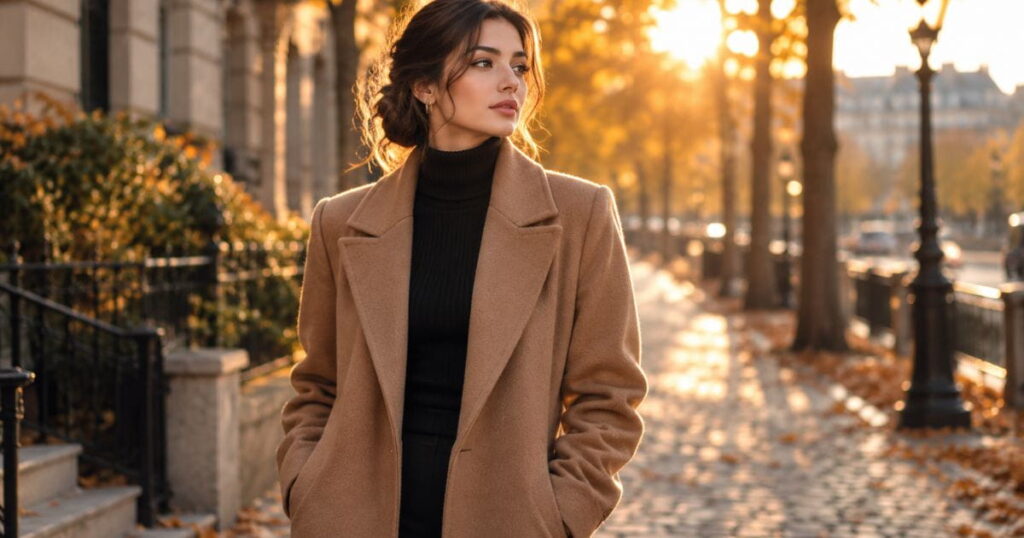
a confident woman in her late 20s wearing a tailored camel wool coat over a black turtleneck, standing on a cobblestone street in autumn, golden hour backlight, shot on a 50mm lens, fashion editorial photography –ar 4:5 –v 7
Notice the order: who → wearing what → where → lit how → shot how → format. Once this order becomes muscle memory, every other hack in this list is just refining one of those six slots.
A common beginner mistake is front-loading a prompt with mood adjectives — “beautiful, stunning, gorgeous, elegant” — before ever describing the actual garment or scene. Those words are doing almost no work for Midjourney; the model doesn’t have a clearer picture of “stunning” than it does of nothing at all. Spend that word budget on concrete nouns instead. “Beautiful woman in a dress” and “woman in a bias-cut silk slip dress” will diverge sharply in output quality, and only one of them is telling the model anything it can actually render.
Hack 2: Use Precise Fashion and Fabric Vocabulary
Vocabulary is where most AI fashion prompts for Midjourney fall apart before they even get started. “Nice dress” is not a prompt, it’s a placeholder for one. Midjourney’s training data is dense with fashion photography, catalog imagery, and editorial spreads, which means it actually understands specific textile and construction terms — and rewards you for using them.
Vague language forces the model to guess, and it guesses toward the most statistically common option, which is usually the least interesting one. Precise language narrows the guesswork and gets you further from “generic stock photo” territory.
How to Apply It
Swap general nouns for specific ones: instead of “dress,” try “bias-cut silk slip dress” or “structured taffeta ball gown.” Instead of “jacket,” try “cropped tweed bouclé jacket” or “oversized raw-denim trucker jacket.” Add fabric behavior words too — draped, structured, pleated, quilted, ribbed — since these tell the model how the material should move and catch light.
Example prompt:
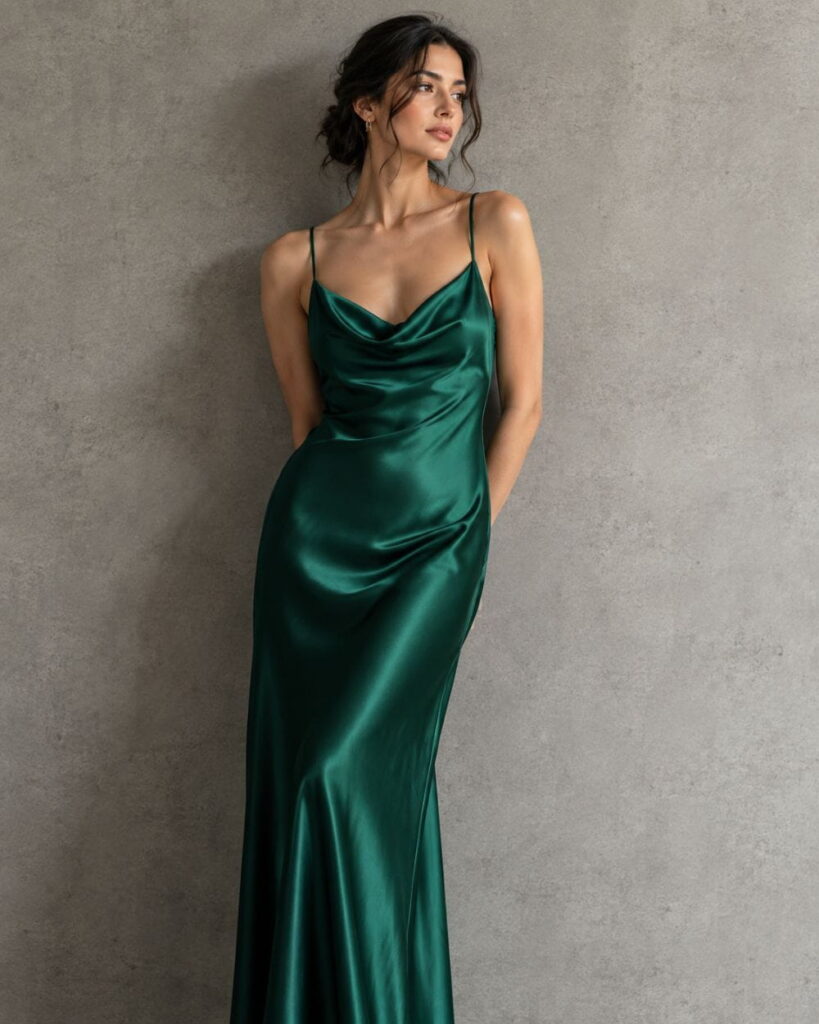
a woman wearing a bias-cut emerald silk slip dress with a cowl neckline, draped fabric catching soft light, standing against a plain concrete wall, minimalist studio photography –ar 3:4 –v 7
Run this next to a version that just says “green dress” and the difference in texture quality is obvious within one generation.
It helps to build a personal reference list of go-to fabric and cut terms sorted by category, the way a stylist keeps a lookbook of vocabulary rather than reinventing it each time. If you want to go deeper on how fabric actually renders, our guide to photorealistic fabric folds prompts for AI fashion illustration covers drape and texture in more depth than fits here. A short starter list: for tops — cropped, boxy, fitted, off-the-shoulder, puff-sleeve. For outerwear — structured, oversized, double-breasted, quilted, belted. For dresses — bias-cut, wrap, empire-waist, bodycon, tiered. For fabric — silk charmeuse, bouclé, raw denim, ribbed knit, taffeta, organza. Mixing one cut term with one fabric term almost always outperforms a single generic adjective.
Hack 3: Control Lighting Like a Photographer
Among all the AI fashion prompts for Midjourney hacks in this guide, lighting is the one most people skip entirely. Lighting is the single most underused lever in fashion prompting, and it’s the fastest way to go from “AI-generated” to “shot by a professional.” Midjourney has clearly absorbed the visual grammar of studio lighting setups, golden-hour outdoor shoots, and moody editorial spreads — but only if you actually name the lighting style.
Leave lighting out and you’ll get flat, evenly lit images that read as default and a little lifeless. Name it and the whole mood of the shot shifts.
How to Apply It
Pick a lighting phrase that matches the story you’re telling: “soft diffused window light” for something intimate and natural, “dramatic Rembrandt lighting” for something moody and high-contrast, “golden hour backlight” for warmth, or “hard studio strobe with deep shadows” for something bold and editorial.
Example prompt:
a woman wearing a black leather trench coat, dramatic Rembrandt lighting with deep shadows, moody urban rooftop at night, cinematic fashion photography –ar 3:4 –v 7
If you’re not sure which lighting term fits your idea, describe the mood instead (“moody,” “airy,” “high-fashion glossy”) and let Midjourney translate it — it’s surprisingly good at that too, but naming the actual lighting technique gives you more control.
Lighting also interacts with fabric in ways worth planning for. Sequins, silk, and patent leather need hard, directional light to show their reflective quality — flat lighting makes them look dull and plastic-like. Wool, cotton, and matte knits look better under soft, diffused light, since hard light can exaggerate texture in an unflattering way. If a generation comes back looking “cheap” despite a good garment description, lighting mismatch is often the hidden culprit.
Hack 4: Speak the Language of Camera and Lens
Camera language is what separates flat AI fashion prompts for Midjourney from ones with real photographic depth. Camera and lens terminology does double duty in a prompt: it signals photographic realism to the model, and it controls composition and depth of field. This is one of those hacks that sounds like it shouldn’t matter for an AI image, but it consistently does.
Different focal lengths compress or expand a scene differently, and Midjourney has learned those visual signatures from millions of real photographs tagged with camera data.
How to Apply It
For a tight, flattering portrait-style crop with soft background blur, reach for “85mm lens, f/1.8.” For a wider environmental shot that still keeps the subject sharp, try “35mm lens, f/4.” For full-body editorial shots with a bit of classic compression, “105mm lens” is a reliable choice. Add film-photography language like “shot on Kodak Portra 400” or “35mm film grain” if you want a warmer, less digital finish.
Example prompt:
full-body fashion portrait of a woman wearing an oversized beige blazer and wide-leg trousers, walking through a sunlit courtyard, shot on 35mm lens, natural film grain, editorial style –ar 2:3 –v 7
Hack 5: Use Style References for a Consistent Look
This is where AI fashion prompts for Midjourney stop being one-off images and start becoming a real, repeatable series. If you’ve ever generated ten fashion images for the same “collection” and had them come back looking like they belong to ten different photographers, style references solve that. Midjourney’s –sref parameter lets you feed in a reference image and pull its visual DNA — color grading, lighting mood, composition style — into new generations.
This is the hack that turns a scattered folder of one-off images into something that reads as a cohesive lookbook or campaign.
How to Apply It
Generate or find one image with the aesthetic you want (your own earlier Midjourney output works well, since you already have image-generation rights to it), grab its URL, and append –sref [URL] to your new prompts. Add –sw (style weight) between 50 and 400 to control how strongly the reference influences the result — lower values keep more of your text prompt’s control, higher values lean harder into the reference style.
Example prompt:
a woman wearing a cream cashmere sweater and pleated midi skirt, seated in a sunlit library, soft natural light –ar 4:5 –sref [your-reference-url] –sw 150 –v 7
Keep a small personal library of reference URLs sorted by mood — “warm editorial,” “cool minimalist,” “high-contrast street style” — so you can drop the right one in without hunting for it every time.
One thing worth testing deliberately: –sref pulls color grading and composition far more reliably than it pulls specific garment shapes, so don’t rely on it to “copy an outfit” from a reference image — that’s a job for your text description in Hack 2. Use style references for the overall photographic feel of a series, and use precise fabric and cut language to control what’s actually being worn in each shot.
Hack 6: Lock In Consistent Characters
Consistency is the hardest problem in AI fashion prompts for Midjourney, and character references are the fix. Nothing breaks the illusion of a fashion campaign faster than the “model” having a different face in every shot. Midjourney’s --cref (character reference) parameter addresses this directly by locking facial structure and identity markers across multiple generations.
This matters most if you’re building a recurring “muse” for a brand mood board or a multi-image editorial story where continuity is the whole point.
How to Apply It
Generate a strong base portrait first, then reuse its image URL as your character reference in every subsequent prompt with –cref [URL]. Pair it with –cw (character weight, 0–100) — closer to 100 locks the whole face and body more tightly, while lower values let clothing and pose vary more freely while keeping the face recognizable.
Example prompt:
the same woman now wearing a red wool coat, standing at a train platform in winter, soft overcast light –ar 3:4 –cref [your-reference-url] –cw 90 –v 7
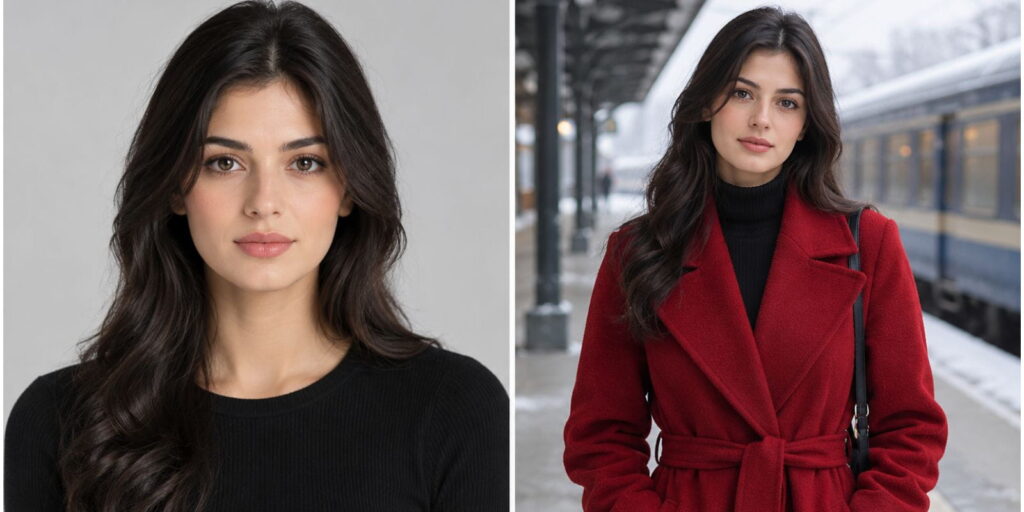
This is also the hack that gets asked about most in AI photo communities right now — people specifically hunting for ways to keep a consistent “face match” across a set of outfit changes, which is exactly what –cref was built for. See our full Midjourney Fashion Prompts collection for more parameter combinations if you’re building a recurring character.
Character references work best when the base portrait is clean and forward-facing, with even lighting and a neutral expression — think passport photo, not dramatic side-profile editorial shot. Midjourney has an easier time extracting and reapplying facial structure from a simple reference than a heavily stylized one, even though the stylized shot might look nicer on its own. Save the dramatic lighting and angles for the outfit-change generations that reference this base image, not for the reference image itself.
Hack 7: Choose the Right Aspect Ratio for Fashion
Framing is an easy thing to overlook in AI fashion prompts for Midjourney, but it shapes the whole read of the garment. Aspect ratio isn’t just a technical afterthought — it changes how a garment reads. A full-length gown needs vertical room to breathe. A close-up beauty shot of an accessory wants a tighter, more square crop. Pick the wrong ratio and Midjourney will often crop or compose the outfit awkwardly to fit the frame you gave it.
How to Apply It
Use –ar 3:4 or –ar 4:5 for standard portrait and social-ready fashion shots — these mirror the crop Instagram and Pinterest favor. Use –ar 2:3 for full-length editorial looks where you need the whole outfit, shoes included, in frame. Use –ar 1:1 for product-style flat lays or accessory close-ups. Use –ar 16:9 only for wide environmental or campaign-banner shots where the outfit is part of a larger scene rather than the sole focus.
Example prompt:
full-length editorial shot of a woman wearing a floor-length sequined gown, dramatic stage lighting, dark background –ar 2:3 –v 7
Hack 8: Write Smart Negative Prompts
No set of AI fashion prompts for Midjourney is complete without a plan for what to exclude. Midjourney V7 handles anatomy far better than earlier versions, but fashion-specific problems still show up: extra fabric folds that don’t make sense, mismatched shoes, warped jewelry, or hands that look almost right. A negative prompt tells the model what to actively steer away from.
How to Apply It
Add –no followed by a comma-separated list of the specific problems you keep running into, rather than a generic catch-all list. If your last five generations kept adding a bag nobody asked for, write –no handbag. If shoes keep vanishing into the hem of long dresses, write –no cropped shoes. Being specific to your actual recurring problem works far better than pasting a giant universal negative-prompt list you found online.
Example prompt:
a woman wearing a fitted white blazer dress, standing in a marble hallway, soft even light –ar 4:5 –no handbag, sunglasses, jewelry –v 7
Hack 9: Iterate With Variations and Remix Mode
Refining AI fashion prompts for Midjourney is an iterative process, not a one-shot request. Your first generation is a draft, not a final. The fastest fashion prompters don’t write one perfect prompt — they write a solid starting prompt, then use Midjourney’s variation buttons and Remix mode to steer the result in small, controlled steps rather than starting over from scratch every time.
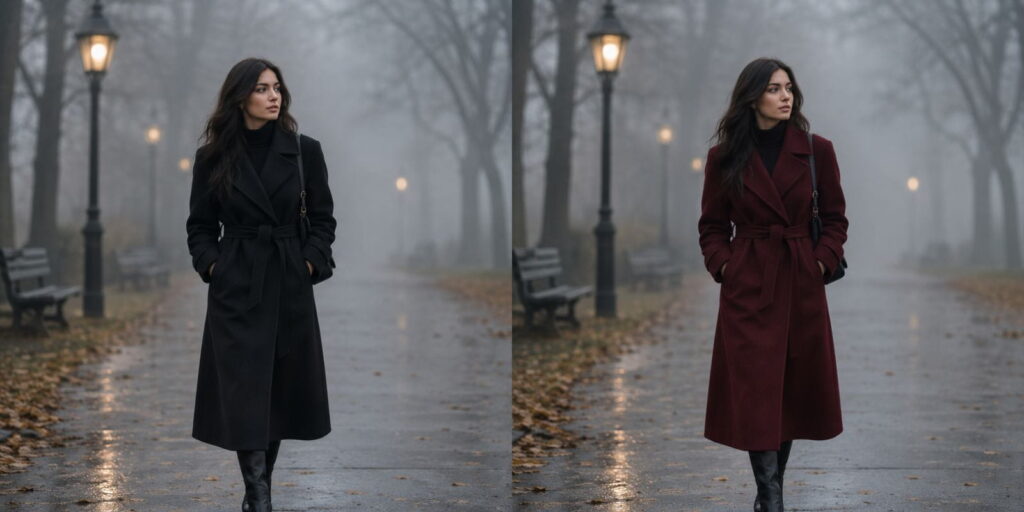
How to Apply It
After your initial grid, use the “Vary (Subtle)” button to nudge details like fabric drape or pose without losing the overall composition, or “Vary (Strong)” when you like the concept but want a more different execution. Turn on Remix mode in settings so you can edit the actual prompt text between variations — this is how you change “black coat” to “burgundy coat” while keeping the same pose and lighting setup, instead of rolling the dice on a completely new image.
Example workflow:
Base prompt: a woman wearing a black wool coat, walking through a foggy park, moody light –ar 4:5 –v 7
→ Generate → Remix → edit “black wool coat” to “burgundy wool coat” → Vary (Subtle) on the best result
Hack 10: Batch and Chain Prompts for a Full Collection
Scaling AI fashion prompts for Midjourney into a full collection takes a different workflow than making one great image. If you’re producing more than a handful of images — a lookbook, a moodboard, a full seasonal “collection” — writing each prompt from scratch is slow and inconsistent. The fix is templating: build one master prompt structure with placeholder slots, then swap only the variable pieces for each new image.
How to Apply It
Write a template that keeps your setting, lighting, camera, and parameters fixed, and only swaps the garment and color for each new piece. This keeps every image in the set visually related, the way a real photoshoot keeps the same set and lighting rig across dozens of outfit changes.
Template:
a woman wearing [GARMENT], standing in a sunlit minimalist studio, soft diffused light, shot on 85mm lens –ar 4:5 –v 7
Swap in for each piece:
[GARMENT] = a structured ivory blazer dress
[GARMENT] = a pleated burgundy midi skirt with a cream blouse
[GARMENT] = an oversized grey wool coat over black trousers
Run each version through the same –sref from Hack 5 and you’ll end up with a set that looks like it came from one continuous shoot rather than ten unrelated sessions. This same templating approach is exactly how we built out our 100 Luxury AI Fashion Prompts for Runway & Editorial Photoshoots collection, if you want to see it applied to a full set.
This templating approach also makes it much easier to spot which specific garment description is underperforming. If nine out of ten pieces in a batch render cleanly and one consistently comes back distorted, you know the problem is isolated to that garment’s description rather than something wrong with your overall setup — which saves a lot of time troubleshooting compared to writing ten completely different prompts and having no clean baseline for comparison.
Common Mistakes to Avoid With AI Fashion Prompts for Midjourney
Even after learning the ten AI fashion prompts for Midjourney hacks above, a handful of habits quietly undo good prompts. Here are the ones I see most often — and the ones I still have to catch myself doing.
Stacking too many garments in one prompt. Trying to describe a coat, a dress, a scarf, and boots all in one sentence usually results in Midjourney blending or dropping pieces rather than rendering all four cleanly. Prioritize the one or two garments that matter most to the shot and let the rest stay vague or get cropped out of frame.
Overusing camera parameters that fight each other. Asking for both “wide-angle establishing shot” and “85mm portrait lens” in the same prompt gives the model contradictory instructions about how tight or loose the framing should be. Pick one framing intent and stick with it.
Forgetting that “AI fashion prompts for Midjourney” still benefit from real fashion knowledge. The people getting the best results aren’t necessarily the best prompt engineers — they’re often the ones who understand garments well enough to describe them accurately in the first place. If you’re not sure what a “cowl neckline” or “peplum waist” actually looks like, a quick reference search before you prompt will save you several wasted generations.
Ignoring the seed number when troubleshooting. If a specific generation is almost right, note its seed number before moving on. Reusing that seed while tweaking small prompt details is a far more controlled way to iterate than starting fresh each time and hoping for a similar result.
Putting It All Together
None of these ten hacks work in isolation — the real skill in writing AI fashion prompts for Midjourney is layering them. A strong prompt uses the six-part formula from Hack 1, dresses the subject with the specific vocabulary from Hack 2, lights the scene deliberately per Hack 3, frames it with real camera language from Hack 4, and locks consistency across a set using style and character references from Hacks 5 and 6. The aspect ratio, negative prompts, iteration, and batching from Hacks 7 through 10 are the polish that turns a good single image into a usable, repeatable workflow.
If you only take one thing away, make it this: Midjourney rewards specificity everywhere — in the garment, the light, the lens, and the framing. Vague prompts get vague, forgettable results. Specific ones get images you’d actually want to put in a portfolio.
For the official, most current parameter documentation (aspect ratios, style weights, and version numbers do change), check Midjourney’s official documentation directly rather than relying on older guides, since new versions roll out several times a year.
Related reading: Midjourney Fashion Prompts: 100 Powerful Prompts to Create Stunning AI Fashion Designs · Best Fashion Prompt AI Examples for Midjourney (60+ Pro Prompts Guide) · How to Write AI Fashion Prompts: 8 Powerful Secrets for Stunning Fashion Images
Frequently Asked Questions
What are AI fashion prompts for Midjourney exactly?
They’re structured text descriptions written specifically to get realistic, high-quality clothing and fashion imagery out of Midjourney. A good one describes the subject, the garment in specific fabric and construction terms, the setting, the lighting, the camera and lens, and the technical parameters — rather than a vague one-line request.
Which Midjourney version is best for fashion images?
As of 2026, Midjourney’s newer model versions handle fabric texture, hands, and facial consistency noticeably better than earlier ones. Whatever version is current when you’re reading this, it’s worth checking Midjourney’s own changelog before a big project, since default settings and available parameters shift between versions.
How do I keep the same face across multiple outfit changes?
This is one of the most common questions about AI fashion prompts for Midjourney. Use the –cref (character reference) parameter with a strong base portrait as your reference image, and adjust –cw (character weight) up toward 90–100 to keep facial identity locked while the outfit, pose, and setting change.
Why do my fashion prompts keep producing warped hands or extra fingers?
This has improved a lot in recent Midjourney versions, but it still happens more often in full-body shots with visible hands. Try switching to a –ar ratio that gives hands more room in frame, add a specific negative prompt like –no extra fingers, and consider cropping the composition to a three-quarter or waist-up shot if hands aren’t essential to the concept.
Can I use these prompts for commercial fashion content?
Midjourney’s standard subscription plans include commercial usage rights for images you generate, but always check the current terms of service before using AI fashion prompts for Midjourney in paid client work or ad campaigns, since licensing terms can be updated.
Do these prompt structures work on other AI image tools too?
The underlying logic behind AI fashion prompts for Midjourney — subject, garment, setting, light, camera, parameters — transfers well to other generators like Leonardo AI, Adobe Firefly, or Stable Diffusion, though the specific parameter syntax (like –ar or –sref) is unique to Midjourney and won’t carry over directly.
How long should a good fashion prompt be?
There’s no fixed word count, but most strong fashion prompts land somewhere between 25 and 50 words once all six formula elements from Hack 1 are included. Shorter prompts tend to leave too much to chance; much longer ones start to dilute the model’s attention across too many competing details, which can actually reduce how faithfully any single element gets rendered.
Is it better to describe the outfit or upload a reference photo?
Both have a place. Text descriptions give you the most creative control and are essential for generating something that doesn’t exist yet. Reference images (via –sref or –cref) are better for consistency across a set or for capturing a specific mood you can point to but struggle to put into words. Many experienced prompters use text for the garment and references for the lighting and color grading, combining both in the same prompt.