
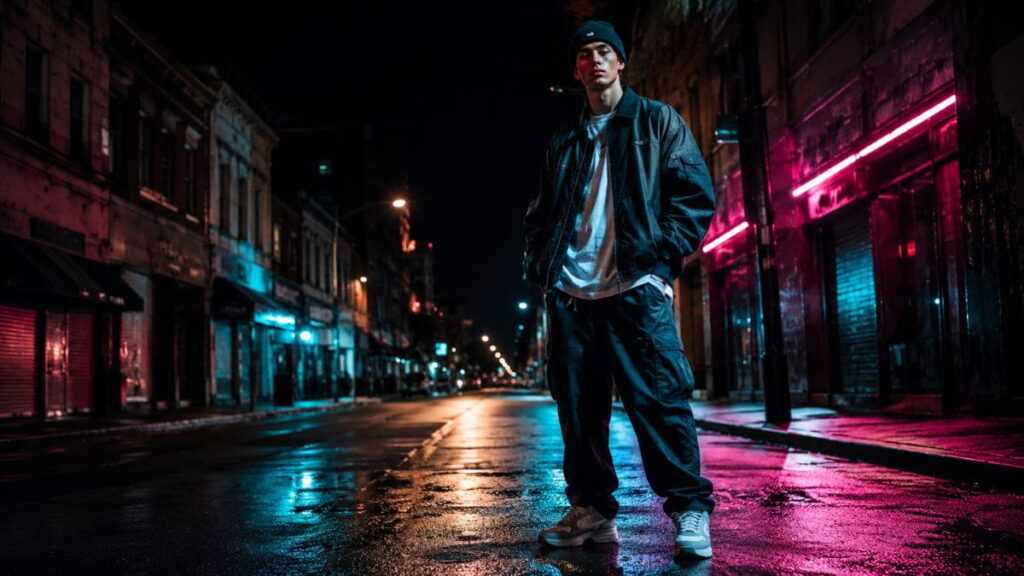
AI prompts for streetwear photography don’t work the same way editorial prompts do, and that’s the whole point. Editorial photography chases clean, controlled, flattering light. Streetwear chases grit. It wants shadows that bite, color that clashes, and a mood that feels like it was grabbed off a curb at 11 p.m. instead of built in a studio. If you’ve been feeding your AI image generator the same soft, diffused-light prompts you’d use for a fashion editorial and wondering why your streetwear shots look flat, this is why.
This guide breaks down seven lighting hacks that separate real streetwear energy from generic AI fashion output, plus exactly how to phrase each one as a working prompt. Whether you’re using Midjourney, DALL-E, Stable Diffusion, or Adobe Firefly, the underlying logic is the same: you’re not describing a person in clothes, you’re describing a lighting scenario the clothes happen to be standing inside of. If you’re still learning how to structure effective fashion prompts, our guide to AI fashion prompts is a useful starting point before experimenting with more specialized streetwear lighting techniques.
These AI prompts for streetwear are designed to help you control lighting, shadows, color, and atmosphere instead of relying on generic fashion photography instructions. If you’re still learning how to structure effective fashion prompts, our guide to AI fashion prompts is a useful starting point before experimenting with more specialized streetwear lighting techniques.
Why AI Prompts for Streetwear Lighting Needs Its Own Prompt Language
Editorial lighting is built around one goal: make the garment look expensive. That means soft key lights, gentle fill, a rim light for separation, and almost nothing left to chance. It’s controlled because the client paid for control.
Streetwear photography inverts that. The best shots in the genre — the ones that end up on brand Instagram grids and get reposted by hypebeast accounts — usually look like they weren’t lit at all. A flash that’s too hard. A streetlight that’s too orange. A background that’s blown out because nobody had time to meter it properly. That “mistake” aesthetic is the actual craft, and it’s why generic AI prompts for streetwear photography so often miss the mark. Most people prompting an image generator default to the same three or four lighting words — “soft lighting,” “studio lighting,” “professional photography” — which are exactly the words that kill the vibe.
If you want AI-generated streetwear images that actually look like streetwear and not like a stock photo in a hoodie, you need to prompt for the imperfection on purpose. Below are seven specific lighting setups pulled from real street and fashion photography, translated into prompt language you can drop straight into your generator of choice. The difference becomes obvious when AI prompts for streetwear describe the physical behavior of light instead of simply asking for a “cool” or “dramatic” image.
Hack 1: Clashing Color Temperatures
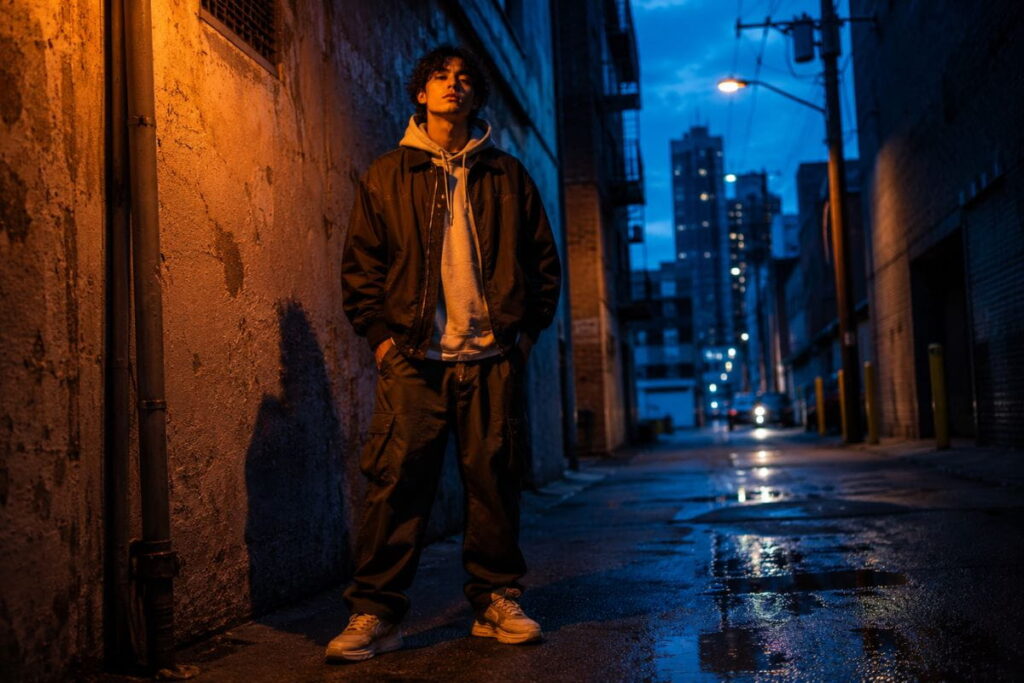
The first and most reliable of these AI prompts for streetwear photography is the color temperature clash — mixing warm tungsten or sodium-vapor light with cool daylight or blue-hour ambient light in the same frame. This is what happens naturally under a streetlamp at dusk, or inside a parking garage lit by old sodium bulbs while the sky outside is still cobalt blue. Editorial shoots avoid this because it’s “technically incorrect” white balance. Streetwear photographers chase it because it creates instant visual tension.
How to Apply It
Describe two distinct light sources with two distinct color temperatures, and be explicit that they should not be color-corrected to match. In your prompt, name the warm source (sodium streetlight, tungsten bulb, incandescent shop sign) and the cool source (blue hour sky, overcast daylight, fluorescent tube) separately, and add a phrase like “uncorrected white balance” or “mixed lighting, no color grading” so the model doesn’t quietly neutralize the clash.
A working prompt structure looks like this:
“Street photography, model in oversized streetwear, standing under a warm sodium streetlamp on the left, cool blue dusk sky filling the background on the right, uncorrected mixed white balance, visible color temperature clash, grainy 35mm film look, urban alley setting.”
This approach makes AI prompts for streetwear much more effective when you want the final image to retain the raw color contrast of a real urban environment.
The keywords doing the heavy lifting here are “uncorrected,” “mixed white balance,” and naming both light sources explicitly. Drop any of the three and most generators will default back to neutral, editorial-safe color grading.
If you’re exploring different urban styling directions alongside lighting, our streetwear fashion prompts guide offers additional outfit and styling ideas that work well with these lighting setups.
Hack 2: Hard Direct Flash
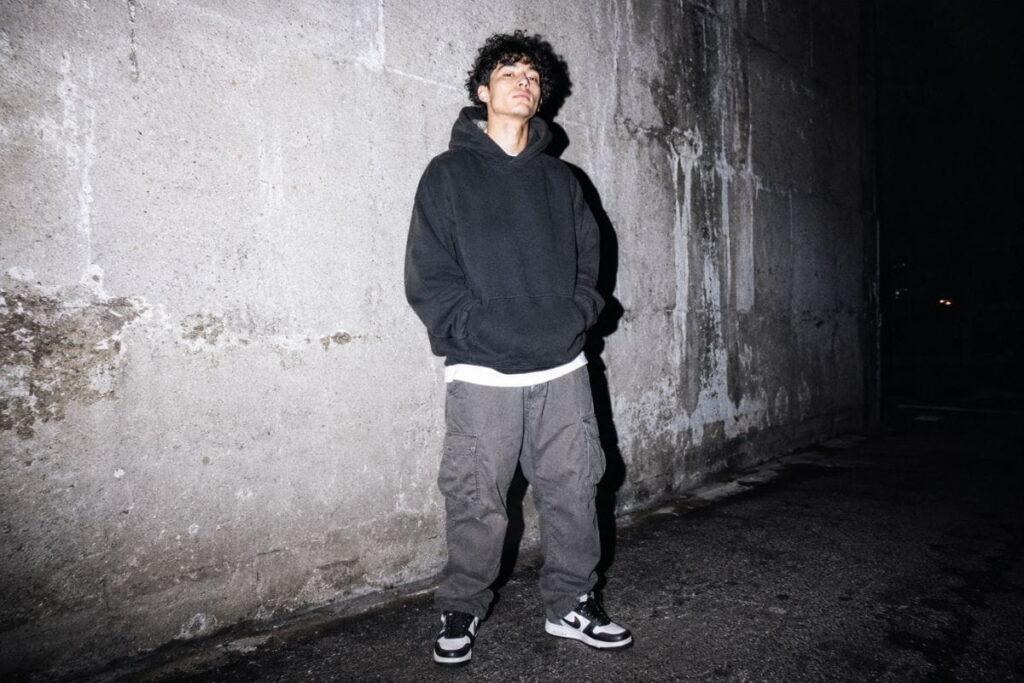
Hard, on-camera flash is one of the most distinctive AI prompts for streetwear photography because it’s the visual signature of an entire photography movement — think early-2000s disposable camera shots, DIY zine photography, and the flash-heavy work that brands like Supreme and Palace built their visual identity around. It’s harsh, it blows out skin tones slightly, it throws a hard shadow behind the subject, and it flattens depth in a way that reads as authentic and unpolished.
One of the most useful things about AI prompts for streetwear is that you can deliberately control how much of the scene disappears into shadow. Instead of asking for generic “dramatic lighting,” describe the direction of the light and exactly which parts of the outfit should remain visible.
For AI prompts for streetwear, direct flash is especially useful when you want an intentionally imperfect, candid fashion-photography aesthetic.
How to Apply It
Prompt for “direct on-camera flash” or “point-and-shoot flash photography” rather than “flash lighting,” which is too vague and tends to get interpreted as a softbox. Ask specifically for a hard drop shadow on the wall or ground behind the subject, slightly blown highlights on the skin, and a dark, underexposed background outside the flash’s reach. This last part matters — direct flash only lights what’s close to the camera, so the background should read almost black.
Example prompt:
“Point-and-shoot direct flash photography, streetwear model against a brick wall at night, hard flash shadow cast on the wall behind the subject, slightly overexposed highlights on skin and white sneakers, background falling into near-total darkness outside the flash range, disposable camera aesthetic, slight grain.”
If your output still looks too clean, add “amateur flash photography” or “paparazzi style” — both phrases nudge the model toward the harsher, less-considered look you’re after.
Hack 3: Neon and Signage as Key Light
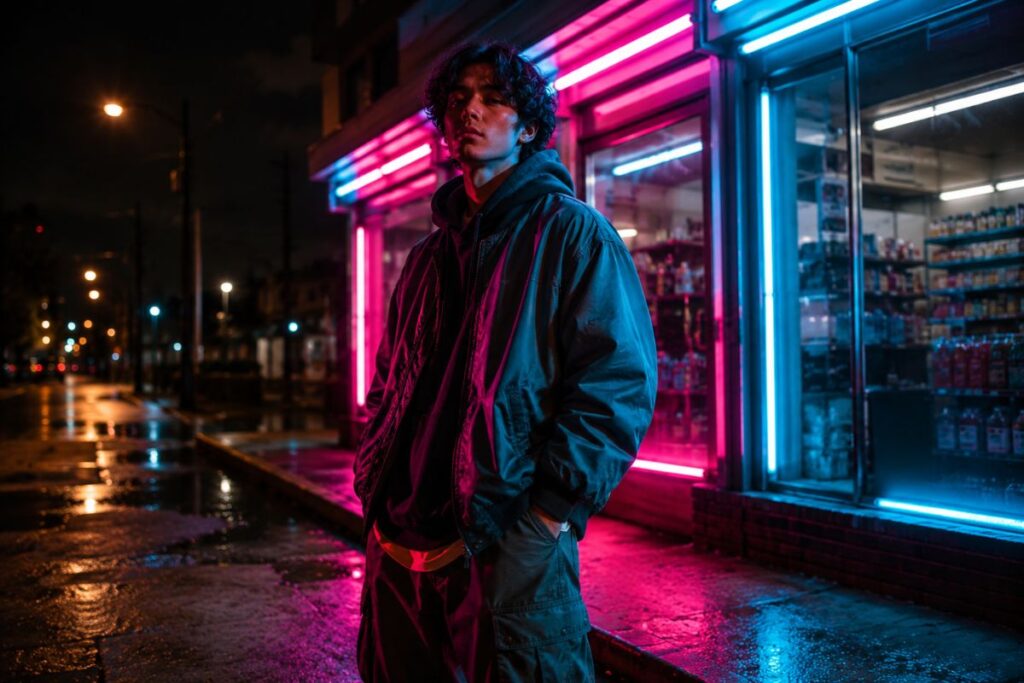
This is one of the most effective AI prompts for streetwear photography, and for good reason. It’s the look behind countless viral lookbook shots. Instead of a dedicated studio light, the key light comes from a neon sign, an illuminated storefront, or an LED shop window. The color of the light comes directly from the sign, creating saturated pinks, greens, blues, or reds that hit the subject unevenly, while the rest of the scene is illuminated by residual streetlight or moonlight.
How to Apply It
Name the actual sign or light source rather than describing generic neon. “Pink neon sign light” reads differently to a model than “neon lighting,” so be specific about the color and, if helpful, the type of business the sign belongs to, such as a noodle shop, laundromat, arcade, or convenience store. Mention that the light should fall unevenly, appearing brighter on the side of the subject closest to the sign and gradually falling off toward the other side. This gradient helps the lighting look realistic instead of appearing like a colored gel placed over the entire frame.
Example prompt:
“Streetwear model standing outside a late-night convenience store, pink and cyan neon storefront sign as the primary light source, uneven light falloff across the face and jacket, deep shadow on the side away from the sign, wet asphalt reflecting the neon colors, night photography, shallow depth of field.”
Specific light sources like these give AI prompts for streetwear a stronger sense of place and make the clothing feel connected to the surrounding environment.
Adding “reflecting on wet asphalt” or “reflecting in a puddle” is optional but it multiplies the effect for almost no extra prompt length, since reflected neon doubles the color impact of the scene. This approach also works particularly well when you’re building a more polished editorial fashion photography concept around an urban setting.
Hack 4: Harsh Backlight Silhouettes
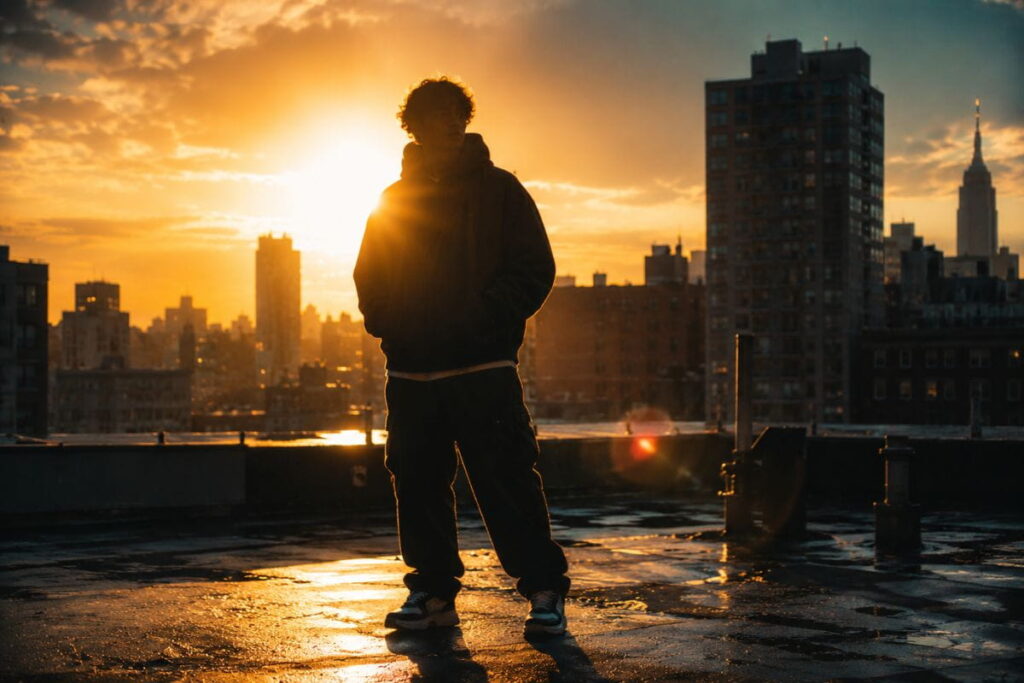
Editorial photography almost never lets the subject go fully into shadow — the face has to read clearly. Streetwear breaks that rule constantly, and one of the more dramatic AI prompts for streetwear photography leans directly into it: shooting straight into a harsh light source (low sun, a single streetlamp, a car’s headlights) so the subject becomes a partial or full silhouette, with just enough rim light to trace the outline of a hoodie, cap brim, or jacket collar.
How to Apply It
The trick is specifying rim light intentionally, since without it most models will simply render a flat black cutout instead of a shape with visible edge definition. Ask for “backlit,” “silhouette with rim light,” and describe exactly where you want the rim light to catch — shoulders, hood edge, sneaker outline. Also specify lens flare or a slight haze, since shooting into a light source in real photography almost always introduces some flare, and that flare sells the realism of the shot.
Example prompt:
“Low afternoon sun directly behind a streetwear model wearing an oversized hoodie, subject rendered as a near-silhouette, thin rim light tracing the hood edge and shoulders, visible lens flare, slight atmospheric haze, urban rooftop background, warm golden tones bleeding around the silhouette edge.”
When written this way, AI prompts for streetwear can create dramatic silhouettes without losing the recognizable shape of the clothing.
Hack 5: Wet Pavement Bounce Light
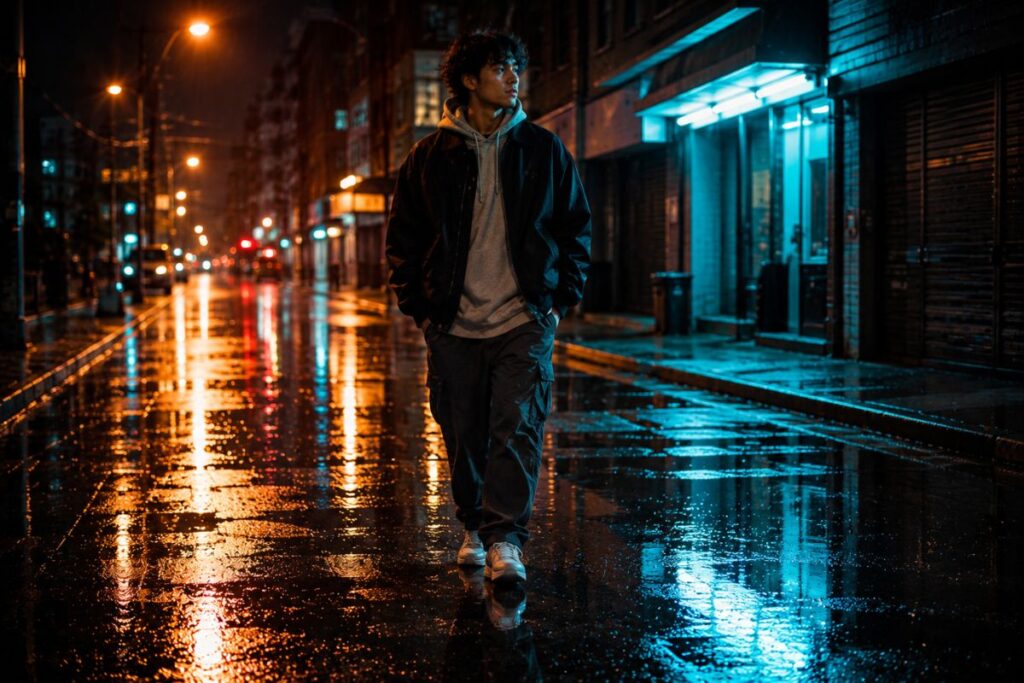
Rain-soaked streets do something editorial studios can’t fake cheaply: every light source in the frame doubles, reflected upward off the ground. This is one of the more technical AI prompts for streetwear photography to get right, because it involves describing bounce light from below in addition to whatever the main light source is doing — a direction most prompts never think to mention.
How to Apply It
State explicitly that the pavement is wet and reflective, and add a phrase like “light reflecting upward from the ground” or “uplight from wet pavement reflections.” Without that direct instruction, most generators will add wet pavement as a texture detail without actually using it as a light source, which defeats the purpose.
When building AI prompts for streetwear, don’t be afraid to specify that the light should feel imperfect or slightly uncontrolled. Small variations in exposure, shadow depth, and light falloff can make an AI-generated image feel much closer to an authentic street photograph.
Example prompt:
“Streetwear model walking through a rain-slicked city street at night, streetlights and shop signs reflected as long streaks on the wet asphalt, subtle uplight on the lower half of the subject from the wet ground reflections, overcast dark sky, muted color palette except for the reflected light streaks, cinematic night photography.”
This is one reason detailed AI prompts for streetwear often outperform short prompts that simply ask for “rainy cinematic lighting.”
Hack 6: Underexposed Ambient With a Single Hot Spot
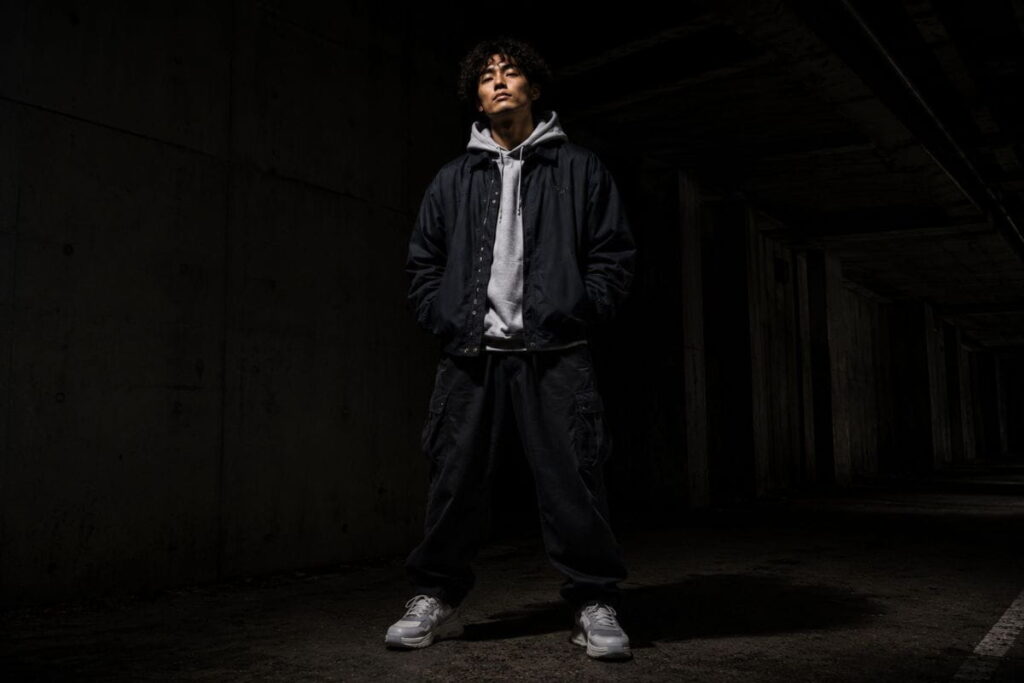
This is the moodiest of the seven AI prompts for streetwear photography, borrowed straight from chiaroscuro portrait lighting but applied to a street setting. The overall scene sits a stop or two underexposed — dark, moody, almost unfinished — except for one small, bright hot spot of light hitting the subject’s face or the garment’s key detail (a logo, a zipper pull, embroidery).
How to Apply It
Ask for the ambient exposure and the hot spot exposure separately. Generic prompts that just say “dramatic lighting” tend to produce evenly moody images with no actual contrast range. Instead, describe the background and majority of the frame as “underexposed,” “shadow-heavy,” or “one stop under,” and then call out the specific small area that should be brightly lit, along with what’s illuminating it (a single bare bulb, a phone flashlight, a shaft of light through a gap).
Example prompt:
“Streetwear model in a dark underpass, entire scene underexposed and shadow-heavy, single shaft of light coming through a gap in the structure above, hard bright spot landing only on the model’s face and chest logo, everything else falling into near-black shadow, high contrast, moody chiaroscuro streetwear photography.”
Hack 7: Motion-Blur Light Trails
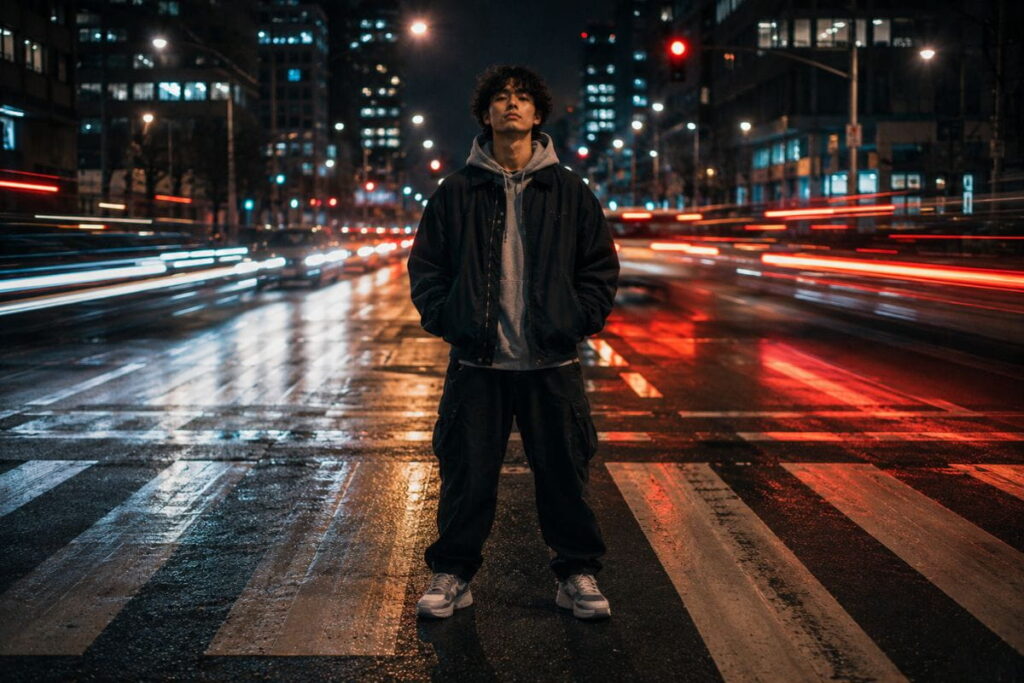
The last of these AI prompts for streetwear photography is less about the light hitting the subject and more about the light moving around them — car headlights, taillights, or passing traffic rendered as long streaks via a slow shutter, while the subject stays sharp. It’s a technically difficult real-world shot (it usually needs a tripod and a very deliberate slow shutter), which is exactly why it reads as high-craft when an AI generator nails it.
How to Apply It
Specify “long exposure,” “slow shutter speed,” or “light trail photography,” and be clear that the subject should remain sharp while only the background lights blur — otherwise you’ll get a fully blurred, unusable image. Naming the light source of the trails (car headlights, taillights, subway lights) helps anchor the color and shape of the streaks.
Example prompt:
“Streetwear model standing still and sharp in the center of a city crosswalk at night, long exposure motion blur from passing car headlights and taillights streaking around the subject in red and white light trails, subject in crisp focus, background softly blurred by motion, night street photography, slow shutter effect.”
Tools That Handle These AI Prompts for Streetwear Best
Choosing the right generator can make a noticeable difference when working with AI prompts for streetwear, particularly when the scene depends on realistic reflections, shadows, or motion. Not every image generator interprets lighting language the same way, so it’s worth knowing where these prompts perform best before you spend an afternoon fighting the model. Once you’ve got the lighting under control, you can experiment with different fashion directions using our luxury fashion prompts collection, especially if you want to move from raw street photography toward more refined high-fashion visuals.
- Midjourney tends to handle mood and color-clash prompts (Hacks 1, 3, and 6) exceptionally well because of how it weights atmospheric and stylistic keywords. Check the Midjourney prompt documentation for the parameter syntax that controls stylization strength, since dialing that up or down changes how literally it follows your lighting instructions.
- Stable Diffusion, especially with a photography-trained checkpoint, is generally the strongest at the harder technical asks like Hack 5 and Hack 7, where physical light behavior (reflection, motion blur) needs to be rendered accurately rather than just stylistically.
- Adobe Firefly is worth trying if you eventually need to composite AI-generated backgrounds with real product photography of the clothing itself, since it’s built to integrate with the rest of the Adobe pipeline.
If you’re new to prompt structure in general, it’s worth skimming a general guide to prompt engineering before specializing into photography prompts specifically — the underlying principles of specificity and ordering apply across every generator.
Building a Reusable Prompt Template
Once you’ve tested a few of these hacks individually, it helps to lock in a template rather than rewriting each prompt from scratch. A reliable structure looks roughly like this:
- Subject and wardrobe — who’s in frame and what they’re wearing, kept brief since the clothing detail usually matters less than the lighting for this exercise.
- Primary light source, named specifically — sodium streetlamp, neon sign, direct flash, low sun. Not “moody lighting.”
- Light behavior — how it falls off, what it reflects on, whether it’s hard or soft, whether it clashes with a second source.
- Environment — the actual location, since background details anchor the light source and keep the model from defaulting to a blank studio backdrop.
- Format and texture — film stock, grain, camera type, aspect ratio.
Keeping that order consistent across attempts makes it much easier to isolate which part of the prompt is causing an unwanted result. If the lighting still looks too clean, the problem is almost always step 2 or step 3 — either the source isn’t specific enough, or the behavior (falloff, reflection, hardness) was left out entirely.
Iterating Instead of Starting Over
A mistake a lot of people make with any of these prompts is treating a bad first result as a reason to rewrite the whole thing. In most generators, it’s more efficient to isolate the one phrase that isn’t landing and swap only that piece. If the color clash from Hack 1 isn’t reading clearly, try swapping “uncorrected mixed white balance” for “clashing color temperature, no color correction applied” — same intent, different phrasing, and sometimes the model responds to one far better than the other even though they mean the same thing to a human reader. Keep a running note of which exact phrases worked for which generator, since that shorthand becomes genuinely valuable once you’re producing images regularly.
For a broader reference on how real photographers think about mixed and available light on location (which is exactly what these prompts are trying to simulate), B&H Explora’s photography section and PetaPixel are both solid ongoing resources, and reading a few real breakdowns will sharpen your prompt-writing instincts faster than trial and error alone.
If you want to go deeper on how to plan an entire shoot concept — AI-assisted or not — our guide to building a full streetwear photography moodboard walks through the planning stage that should happen before you ever open a prompt box, and our breakdown of urban fashion photography composition pairs well with the lighting hacks above once you’re ready to think about framing.
Common Mistakes When Writing AI Prompts for Streetwear
A few patterns show up again and again when people’s streetwear AI images come out looking too polished:
Using “professional photography” as a catch-all. This phrase almost always pushes the model toward clean, even, editorial-style light — the exact opposite of what most streetwear briefs want. Cut it entirely or replace it with a named photography style (disposable camera, 35mm film, point-and-shoot flash).
Forgetting to describe the background separately from the subject. Lighting isn’t just about the person — it’s about what’s happening behind them. A prompt that only describes light on the model and never mentions the environment will usually default to a neutral, blurred, studio-adjacent backdrop.
Over-stacking style keywords. Piling on “cinematic, dramatic, moody, epic, award-winning” rarely adds anything once you’ve already described a specific light source and behavior. Specificity about the physical light beats a pile of mood adjectives every time.
Not naming a color temperature at all. If you don’t specify warm or cool light, most generators default to a flattering neutral white balance, which instantly reads as editorial rather than street.
Skipping texture and grain. A lot of the “aesthetic” streetwear photographers chase — including AI-assisted photographers — comes from film grain, slight noise, or a specific camera format (35mm, disposable camera, early-2000s digital compact). Leaving this out is one of the fastest ways to end up with an image that looks digitally sterile.
Describing the shadow but not the shadow’s edge. Hard light produces hard-edged shadows; soft light produces soft, gradual ones. Saying “with shadows” isn’t enough — if you want the harsh, cut-out shadow look that reads as flash or direct sun, say “sharp-edged shadow” or “hard shadow line.” Otherwise the model tends to render a generic, softly feathered shadow that undercuts the harshness you’re going for elsewhere in the prompt.
Treating the subject’s pose as separate from the lighting request. A backlit silhouette (Hack 4) reads completely differently depending on whether the pose is open or closed — arms tucked in versus a jacket held open to catch the rim light differently. It’s worth a short phrase on pose whenever the lighting setup depends on a specific silhouette shape, since the model will otherwise default to a generic standing pose that may not showcase the light the way you intended.
FAQ: AI prompts for streetwear
What’s the single most important word to include in AI prompts for streetwear photography?
There isn’t one magic word, but naming the actual light source (sodium streetlamp, neon sign, direct flash) rather than a generic mood word (“dramatic,” “moody”) consistently produces more convincing results, because it gives the model something physical to render rather than an abstract feeling to guess at.
Do these lighting hacks work the same across Midjourney, DALL-E, and Stable Diffusion?
The concepts transfer across all three, but each model weighs keywords differently. Midjourney tends to lean more heavily into mood and stylization, while Stable Diffusion checkpoints trained on real photography data often render physical lighting behavior (reflections, motion blur, hard shadows) more literally.
Can I combine more than one of these hacks in a single prompt?
Yes, and some of the best results come from pairing two — neon signage with wet pavement bounce (Hacks 3 and 5), or hard flash with underexposed ambient (Hacks 2 and 6) are natural combinations that mirror how real street photographers actually shoot. Just keep the prompt focused on one dominant light source so the model doesn’t get confused about which light is doing the main work.
Why do my AI streetwear images still look too clean even after using these prompts?
Usually it’s leftover editorial language elsewhere in the prompt — words like “studio,” “professional,” “flawless,” or “high fashion” pull the model back toward polished lighting even if your lighting description is technically gritty. Read through your full prompt and strip out anything that contradicts the raw, imperfect mood you’re going for.
Is it worth using negative prompts to avoid the editorial look?
In generators that support negative prompting (Stable Diffusion, some Midjourney workflows), adding terms like “studio lighting, softbox, symmetrical lighting, flawless skin” to your negative prompt can meaningfully reduce the pull toward polished output, especially when your positive prompt alone isn’t cutting it.
Final Thoughts
The gap between generic AI fashion images and genuinely convincing streetwear photography almost always comes down to lighting specificity. Anyone can prompt “urban streetwear photo, moody lighting” and get something. Getting an image that actually looks like it belongs on a brand’s Instagram grid means naming the light source, describing how it behaves, and being willing to ask for imperfection on purpose.
Start with one hack from this list, run it through your generator of choice, and adjust the wording based on what comes back before stacking on a second technique. Lighting language is the highest-leverage part of these prompts. Get that right, and the rest of the aesthetic tends to follow.
The best AI prompts for streetwear don’t rely on a long list of fashion keywords. They give the image generator enough information about the environment, lighting, shadows, color, and texture to create a believable scene. Experiment with different combinations, compare the results, and refine the wording until the images start to develop the raw, imperfect character you’re looking for.